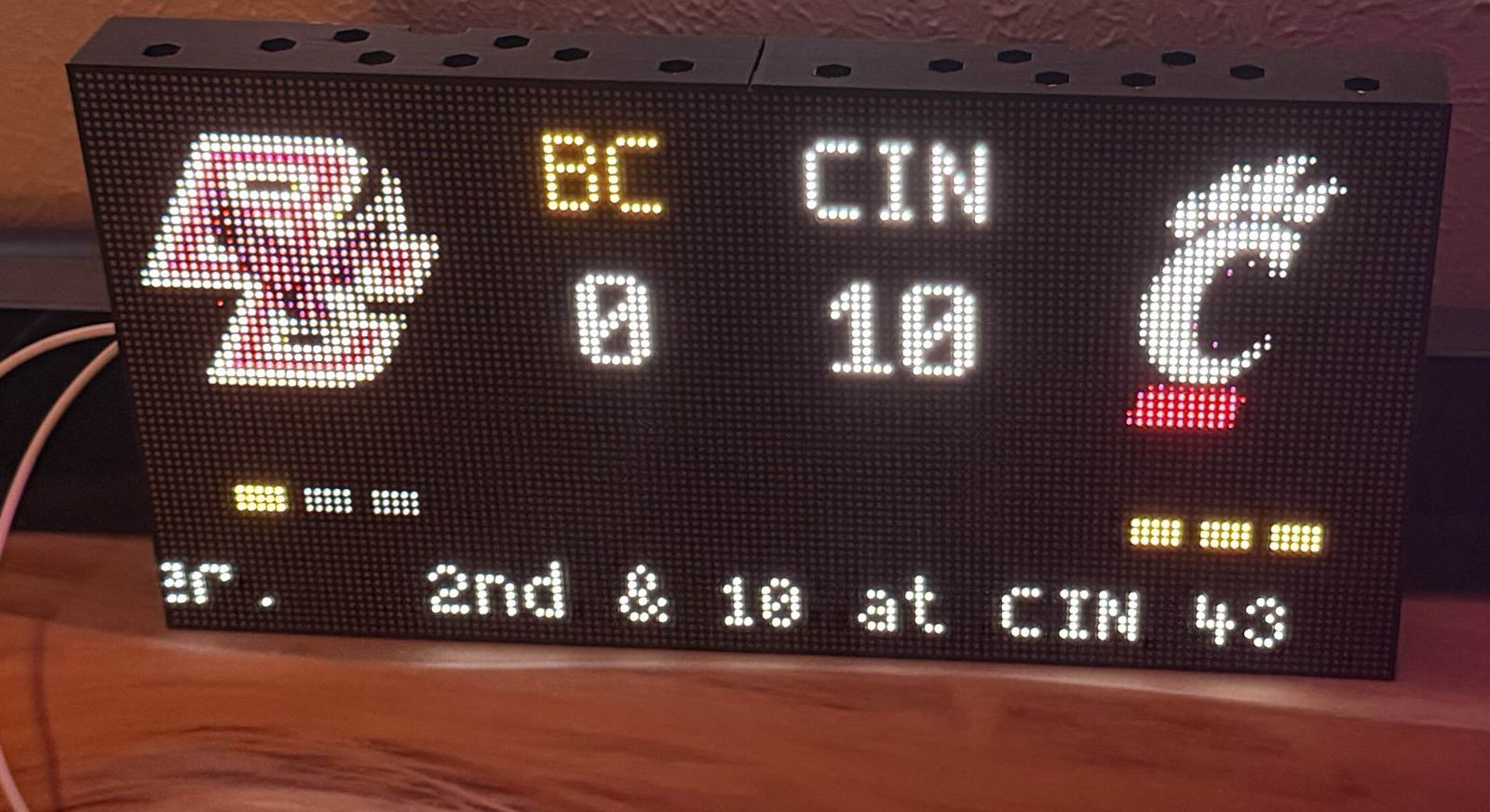
Disclosure: I work for Apollo Automation. The M-1 LED controller driving the matrix in this post is one of our devices.
NFL season started this week and I have a 128x64 HUB75 matrix on the wall (two 64x64 panels, driven by an M-1 running hub75-studio). The obvious move: live scores on the wall, lights going off when my team scores. There’s a great HACS integration called Team Tracker that pulls live game data from ESPN, and hub75-studio already had a Team Tracker page. I figured I’d write a Home Assistant blueprint around it and be done by lunch.
It took the whole day, went through 21 blueprint versions, and ended up somewhere much better than the plan. The result is gameday-matrix: flash the firmware once, import the blueprint, pick your team’s sensor and your matrix from two dropdowns, done. This post is the stuff that went wrong on the way, because that’s where all the actual learning was.
Every config field I added, I later deleted
The first version of the blueprint asked for a lot: the matrix’s page select entity, the exact page name from your YAML, a WLED preset entity, preset names to type in. Each one of those fields got the same reaction from me as a user: why am I filling this in?
The entity picker was the worst. Ask Home Assistant for “a select entity” and it lists every select in your house. Mine showed WLED color palettes and the probe selector from a temperature sensor before it showed the thing I wanted. Blueprint pickers can only filter by integration and domain, not by name, so the fix had to come from the firmware side: ESPHome has a project: metadata field, and once the firmware declares it, Home Assistant records a manufacturer and model for the device. Now the blueprint asks for “your matrix” with a device picker that only lists matrices. That turned into an upstream PR since every hub75-studio user benefits.
Everything else got derived instead of asked. The page name is read out of the select entity’s own option list at runtime. The action name is computed from the device. The WLED preset entity turned out to be derivable from the lights you already picked, and then preset names got replaced by a dropdown of built-in WLED effects, and then that whole idea died too (more below). The blueprint that survived asks two real questions: which team, which matrix.
Compile-time entity binding had to go
The stock Team Tracker page binds your sensor’s entity ID into the firmware at compile time. Change teams, edit YAML, reflash. That’s fine for me and terrible for anyone else.
So the page got rewritten to know nothing about teams. It exposes one ESPHome API action (teamtracker_update) and the blueprint pushes the game data to it: scores, possession, timeouts, the clock, logo URLs. The sensor updates every 10 seconds or so during a game, the automation forwards each update, and the board just draws what arrives. Switching teams is now changing one dropdown in the automation. During testing I pointed it at four different teams in one afternoon without touching the device.
Celebration effects that look good on a strip: almost none
The plan was fireworks on the LED strips behind the TV for touchdowns. WLED has a Fireworks effect built in. It looks like nothing from the couch: sparse random pixels on a strip you see edge-on. We auditioned effects one at a time (Strobe, Strobe Mega, Chase Flash, Theater, Wipe, 8 seconds each) and the honest conclusion was that the best celebration is no effect at all: every light snaps to the team color in a single command, holds about 4 seconds while the matrix does a full-screen TOUCHDOWN splash, then everything goes back to what it was doing.
The single command part matters. An earlier version alternated colors in a loop, and my two WLED strips plus a Zigbee lamp were never in sync, because each color change is a separate network call to hardware with different latencies. One command, one look, nothing to drift.
HyperHDR fights you unless you go through it
The strips behind my TV are fed by HyperHDR, which streams screen-capture colors to them constantly. Any color you send from Home Assistant loses to the stream. First fix: pause HyperHDR, wait for WLED’s realtime timeout (about 2.5 seconds), then celebrate. That works but the 2.5 seconds of dead air before anything lights up killed the moment.
The actual fix was realizing HyperHDR’s own light entities accept colors at a higher priority than capture. Send the team color to HyperHDR instead of to the strips, and it paints instantly through its own stream, no pause, no timeout. The pause logic still exists but only wraps optional WLED effects, and since the strips are already holding the team color when the stream stops, the handoff is invisible.
Cincinnati’s logo is black
Boston College was playing Cincinnati, and the Cincinnati logo rendered as a single red dash. I assumed a broken stream and chased it through the media proxy logs, which showed a perfectly healthy transfer. The logo is just black. On a black display, a black logo is a red dash, because the red accents are the only non-black pixels.
ESPN hosts dark-background variants of every logo: swap /500/ for /500-dark/ in the URL. The blueprint does that rewrite on every push now. If your team’s logo is mostly dark, this is the difference between a scoreboard and a mystery.
Two more that cost real time
The ticker scrolled at random speeds. LVGL animates a scrolling label over a fixed time, not a fixed speed, so a 160-character play description zoomed past while “Final” crawled. Also every data push restarted the scroll from the beginning. Fix: only touch the label when its text actually changed, and scale the animation time to the text length.
GitHub’s raw CDN caches for about 5 minutes, and Home Assistant fetches blueprints through it. I re-imported “the latest version” three times and got a stale copy every time, each time convinced the import was broken. The blueprint carries a version number in its description now, because that’s the only way to know what your HA is actually running.
What shipped
One firmware page that measures the display at boot and lays itself out for a single 64x64 panel or a 128x64 pair (tested both by changing one number in the config, no rewiring). One blueprint with two required dropdowns. Three PRs open against hub75-studio: the project metadata, a shared scroll speed control, and the zero-config page itself.
The part I didn’t expect to like this much: every version got tested against a live college game on the actual wall, with real scores triggering real celebrations. When Indiana kicked an extra point and the board said “IU SCORE,” that’s how I found out my label logic didn’t know what an extra point was. You don’t get that from fake test data.
Cowboys are on next week. The board is ready.